
How to Save Products from Meesho, Flipkart & Amazon in One Place.
Why Indian Shoppers Browse Across Multiple Apps
The average Indian online shopper does not stick to one platform. Meesho has dominated the affordable fashion and ethnic wear segment. Flipkart leads in electronics, footwear, and daily essentials. Amazon holds strong for branded products, books, and international sellers. Myntra is the default for branded fashion. Nykaa for beauty. The reality is that the best deal for any category lives on a different platform.
The problem is that your saved items are siloed. Meesho’s wishlist only stores Meesho products. Amazon’s cart does not hold a Flipkart link. And if you close your browser or restart your phone, those unsaved tabs simply vanish.
The Problem with Screenshots and WhatsApp Links
Most Indian shoppers resort to three workarounds – none of them ideal.
1: Screenshots
You screenshot the product and save it to your gallery. After a week of shopping, your gallery is flooded with product images, all without prices, links, or platform context. Good luck figuring out which screenshot came from where.
2: WhatsApp to Yourself
The “Message Yourself” trick on WhatsApp is popular – paste the product link and send it to yourself. But when you have 30 links scattered across dates in your own chat, comparing them is impossible. There’s no organisation, no folders, no price visibility.
3: Browser Bookmarks
Bookmarking works – until you switch devices. Your phone bookmarks won’t sync to your laptop. Plus, bookmarks give you no product thumbnail, no price at the time of saving, and no way to group items by category.
None of these methods were built for the way Indian shoppers actually shop.
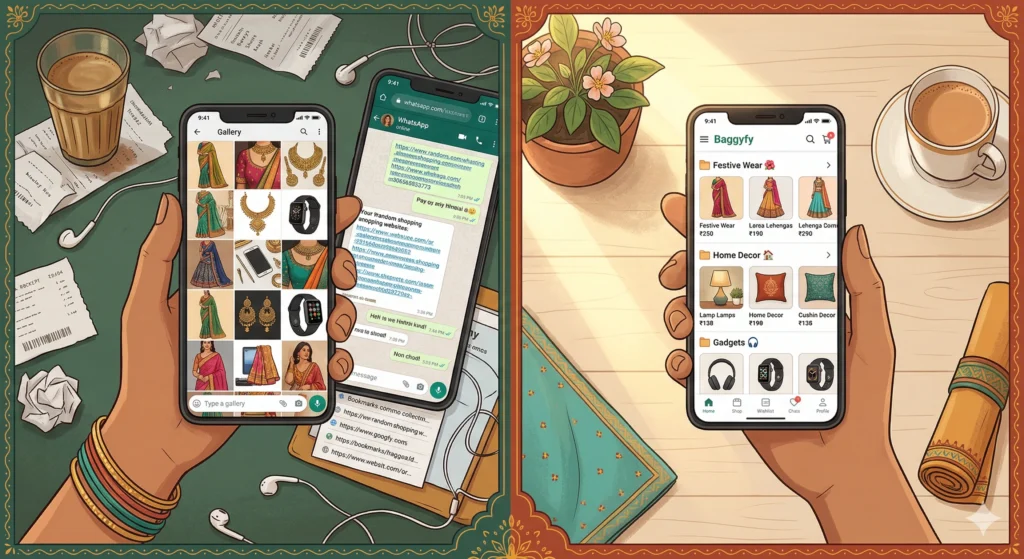
The Solution: One Free Tool That Works with All Indian Platforms
This is where Baggyfy comes in. Baggyfy is a free, web-based shopping wishlist organiser built specifically for Indian shoppers. It works with Amazon India, Flipkart, Meesho, Myntra, Nykaa, Ajio, and 1000+ other online stores – all in one place.
You do not need to download any app. Just open Baggyfy.in on any browser, log in with your Google account, and you are ready to start saving products from any platform you shop on.
How to Save Products from Meesho, Flipkart & Amazon Using Baggyfy
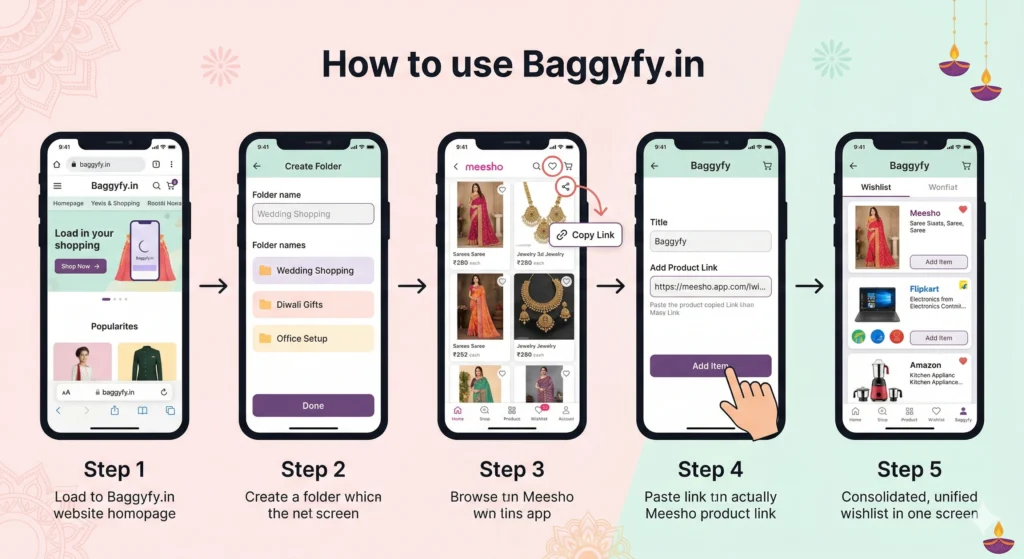
Step 1 – Open Baggyfy.in
Go to Baggyfy.in on your phone or laptop browser. No download required. Sign in with your Google account – it takes less than 30 seconds.
Step 2 – Create Your Folders
Think of folders as your shopping categories. You can create folders like “Wedding Shopping,””Electronics Wishlist,””Ghar ke Liye,” or even “Bas Thoda Ruko” – for items you love but aren’t buying just yet. You can name them anything you want, in English or Hinglish.
Step 3 – Copy the Product Link from Any App
Open Meesho, Amazon, Flipkart, or any other shopping platform. Find the product you want to save. Tap the Share button on the product page and copy the link.
Step 4 – Paste the Link into Baggyfy
Go back to Baggyfy, open the folder you want to save it in, and paste the copied product link. Baggyfy will automatically pull in the product image, name, and price. Your product is now saved – neatly, with context.
Step 5 – Access It Anywhere, Anytime
Because Baggyfy is web-based, your wishlist is accessible from any device – your phone at home, your laptop at work, or your tablet at night. No syncing issues. No platform switching.
Real Use Case: How Priya Plans Her Festive Shopping
Priya is preparing for Diwali shopping. She wants a new kurta set from Meesho, fairy lights from Amazon, and a new mixer from Flipkart. In the past, she would screenshot everything and then forget half of what she saved.
Now with Baggyfy, she creates a folder called “Diwali 2025” and starts adding links from all three platforms. By the evening, her folder has 12 products from 3 platforms – each showing the product name, image, and price. When she is ready to buy, she opens Baggyfy, compares the items, and checks out directly from each platform’s link. No screenshots. No tab chaos. No lost links.
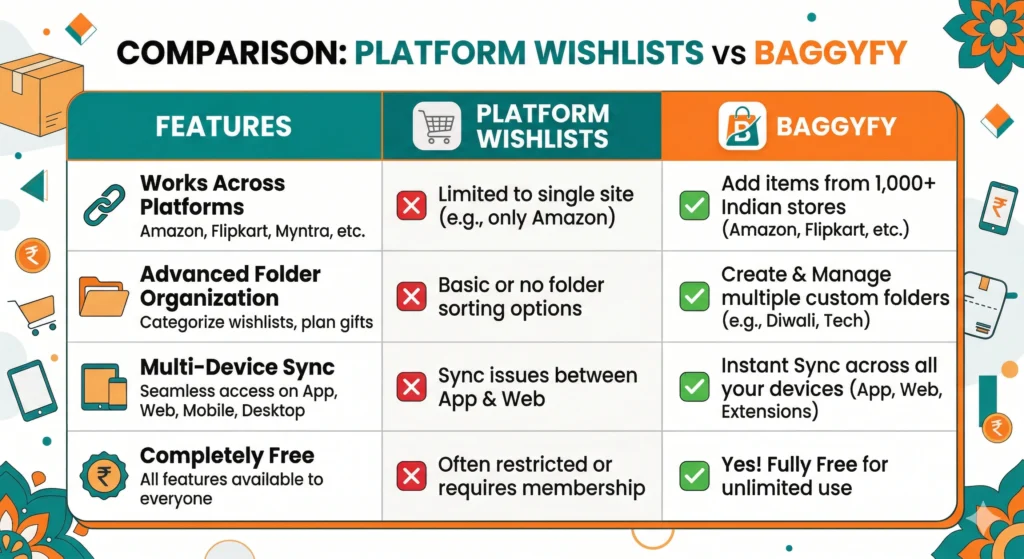
Why Baggyfy is Better Than Platform Wishlists
Each platform’s native wishlist has one fatal flaw – it only holds items from that platform. Here is why Baggyfy beats them all:
- Works across 1000+ Indian stores – not just Amazon, Flipkart, and Meesho
- Free to use – no subscription, no hidden charges
- No app download – works in any browser on any device
- Organised with folders – not a random dump of saved items
- Accessible across all devices – phone, laptop, tablet, all synced.
- Products saved with image and price – not just a raw link
Sale Season Tip: Save First, Buy When the Price Drops
One smart habit Indian shoppers are building with Baggyfy is the “Save Now, Buy Later” approach. Add everything you want across platforms before a big sale – Big Billion Days, Great Indian Festival, End of Reason Sale – into your Baggyfy folder. When the sale goes live, your list is already ready.
This is especially powerful because sale prices on platforms are often time-limited. If you go in prepared with a curated list, you can act fast on the best deals before they expire.
Start Organising Your Shopping Wishlist Today
You don’t need multiple apps, multiple accounts, or complicated workarounds anymore. Baggyfy gives Indian shoppers one clean, free space to save products from every platform – Meesho, Flipkart, Amazon, Myntra, Nykaa, and beyond.
It takes 30 seconds to set up. No download needed. Works on any device. And it is completely free.
"Stop saving links in WhatsApp. Start saving them where they belong - in your Baggyfy wishlist."
Frequently Asked Questions
Is Baggyfy free to use?
Yes. Baggyfy is completely free. There are no premium plans, no subscription fees, and no hidden charges.
Does Baggyfy work with Meesho?
Yes. Baggyfy works with Meesho, Flipkart, Amazon India, Myntra, Nykaa, Ajio, and 1000+ other Indian and global online stores.
Do I need to download an app?
No. As of now Baggyfy is a web-based tool. Just open Baggyfy.in in any browser – Chrome, Safari, or any mobile browser – and start using it instantly.
Is my wishlist saved if I close the browser?
Yes. Because Baggyfy uses Google login to save your data, your wishlist is stored securely and accessible whenever you log back in – from any device.